make connections between objects
Objects can be connected to create logical structures
depending on the application purpose. A linktype
 is specified when making a connection between two OBEROn objects.
One object represents the To-side and one the From-side. OBEROn
will use the To and From labels to determine the link's direction.
The direction you define makes a difference when you navigate through
the connections: in particular you can specify whether or not you
want to see objects that lead to or away from the chosen object.
You can connect two objects if and only if the selected linktype
allows the object class (or one derived from it) on the to and the
from side respectively.
Adding a new Link instance
Users can add a new link instance between two objects
by the "Domain Object Manipulation" client. Simply search
the two objects to connect, select one of them and push the "Add
Link" button.
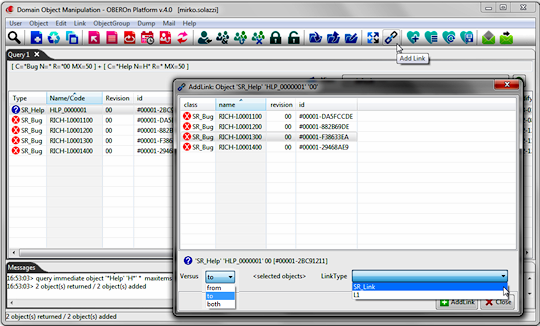
In the "Add Link" form you can choose one
or more objects to connect with the selected one and, you can also
define the connection direction and set the linktype, choosing from
those allowed for the object class. To create a new link, a user
should have the addlinkfrom privilege activated in the current lifecycle
stage
of the from side object, the addlinkto privilege granted in the
to side object's current stage and also the create privilege in the linktype
An equivalent OOQL
command
might be:
object addlink
or
link create
|
| |
'SR_Help' 'HLP_0000001' '00'
or
'SR_Help' 'HLP_0000001' '00' in 'SR_Space'
or
#00001-2BC91211 |
| to |
|
| |
'SR_Bug' 'RICH-I.0001300' '00'
or
'SR_Bug' 'RICH-I.0001300' '00' in 'SR_Space'
or
#00001-F38633EA |
| linktype 'SR_Link' !hidden active ; |
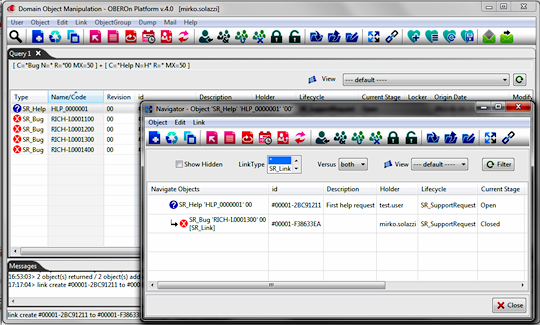
The Navigate function let you to view connected objects for the selected
one.
Modifying a Link
A linktype may or may not have fields associated with it. If it
does, you may assign a specific value to them. To set a link's field value in the "Domain Object
Manipulation" client, you can select the connection from the
navigation window and push the "Edit Link" button.
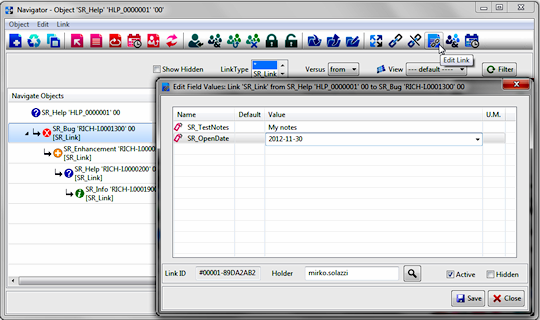
When links are created, the internal
ID and an holder (default=current user) are assigned.
The hidden option (default=false) is associated to the new link instance; it can be used to filter the connections in the object navigation result: hidden links are never reported if you don't specify the "!skiphidden" clause in the navigation command. The active flag (default=true) can be used at the application level.
As an alternative to the From/To connected object names,
you can use this ID to direct access the link. For example, you
can use the following OOQL
command
:
| link edit
#00002-FD60DBE6 |
| |
field[SR_OpenDate]
'2012-11-30' ; |
in place of the more complex command:
| link edit
object |
| |
|
'SR_Help' 'HLP_0000001' '00'
or
'SR_Help' 'HLP_0000001' '00' in 'SR_Space'
or
#00001-2BC91211 |
|
to |
|
|
|
'SR_Bug' 'RICH-I.0001300' '00'
or
'SR_Bug' 'RICH-I.0001300' '00' in 'SR_Space'
or
#00001-F38633EA |
|
linktype
'SR_Link'
field[SR_OpenDate] '2012-11-30' ; |
If you do not assign values to fields, they remain
blank or their default is used if there is one. Not assigned field
values are marked with "X" symbol in the default column.
When you are specifying a value, be sure it is in agreement with
the field definition. In other words, only integer values are assigned
to integer fields, character string values are assigned to character
string fields, and so on. Also, if the field has a range of valid
values, the value you give must be within that range. In this case,
you can select a valid value from the proposed selection list. To
modify link field values, and also the active and hidden flags, a user should have the edit privilege activated linktype , while to change the type of link the changetype privilege is required for the current user. Finally, if the changeholder is enabled, you can modify the holder of the link instance.
Note: you can use the field clause to set the values
also in the addlink OOQL commands.
Copying/Cloning a Link
After a link was added and its values defined, you
can copy (or clone) the link if you have the addlink privileges
on the connected objects and link create privilege on the assigned linktype. During the clone operation you can modify
all basic parameters included the linktype. You can also modify
the values you want to change: if you do not make any changes, the
values remain the same as the original link.
| link edit
#00002-FD60DBE6 |
| |
newtype
'SR_Link_Archived'
field[SR_DataApertura] '04/01/2013' ; |
| link clone
object |
| |
|
'SR_Help' 'HLP_0000001' '00'
or
'SR_Help' 'HLP_0000001' '00' in 'SR_Space'
or
#00001-2BC91211 |
|
to |
|
|
|
'SR_Bug' 'RICH-I.0001300' '00'
or
'SR_Bug' 'RICH-I.0001300' '00' in 'SR_Space'
or
#00001-F38633EA |
| |
linktype 'SR_Link'
newtype 'SR_Link_Archived'
field[SR_OpenDate] '04/01/2013' ; |
Removing a Link
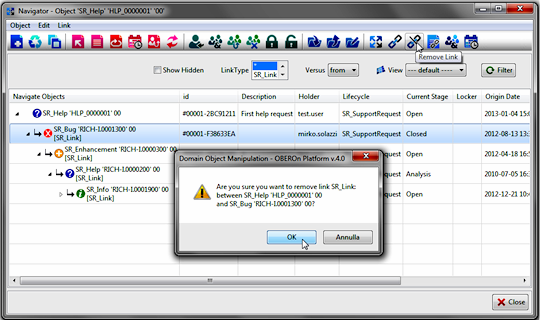
You
can disconnect a link if you have the removelink privileges
on the connected objects and link destroy privilege on the assigned linktype. To remove a link in the "Domain Object
Manipulation" client, you can select the connection from the
navigation window and push the "Edit Link" button.
| link destroy
#00002-FD60DBE6 ; |
| |
|
| link destroy
object |
| |
|
'SR_Help' 'HLP_0000001' '00'
or
'SR_Help' 'HLP_0000001' '00' in 'SR_Space'
or
#00001-2BC91211 |
|
to |
|
|
|
'SR_Bug' 'RICH-I.0001300' '00'
or
'SR_Bug' 'RICH-I.0001300' '00' in 'SR_Space'
or
#00001-F38633EA |
| |
linktype 'SR_Link' ; |
|