|
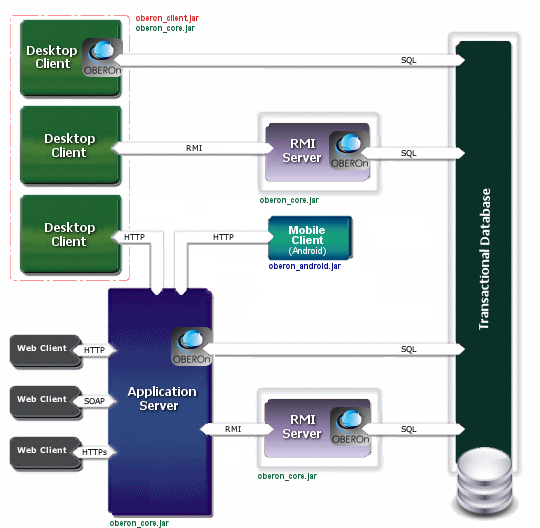
The access to OBEROn database can be realized in
different ways:
A - desktop client directly linked to the database
B - desktop client linked to an OBEROn RMI
server
C - desktop client linked to an HTTP
application server
D - browser with a HTTP(s)/SOAP connection
to an application server. In this case, the application server
can access to OBEROn directly or throw the OBEROn RMI server.
E - mobile client linked to an HTTP application
server
The desktop client (or web client), the OBEROn RMI server, the Application
Server and the database may be physically located on different machines.
A - When a desktop client is directly connected to the database
you must declare in the configuration file (oberon.ini ) all
connection parameters:
|
|
Description |
Samples |
| [CONNECTION] |
|
|
conntype |
type of connection |
conntype=DB
|
|
class
|
jdbc driver class |
class=oracle.jdbc.driver.OracleDriver
class=org.gjt.mm.mysql.Driver
class=org.postgresql.Driver
|
|
drvurl
|
jdbc driver url |
drvurl=jdbc:oracle:thin:@%s:%p:%d
drvurl=jdbc:oracle:oci8:@OBERON_SID
drvurl=jdbc:mysql://%s/%d
drvurl=jdbc:postgresql://%s/%d
|
|
server
|
database server IP or name |
server=127.0.0.1
server=localhost
|
|
port
|
database server port |
port=1521
port=3306
|
|
database
|
database (schema) name |
database=OBERON
|
|
dbuser
|
database user name
(in Oracle is the user associated to the schema) |
dbuser=OBERON
|
|
dbpwd
|
database user password |
dbpwd=OBERONPWD
|
|
tablespace
|
Set "false" if your database doesn't support tablespaces |
tablespace=false
|
|
connections
|
number of SQL connections to open |
connections=3
|
|
mailserver
|
mail server IP or name (for external mail) |
mailserver=localhost
|
|
serverURL
|
application server URL (for webservices) |
serverURL=http://localhost:8080/oberon
|
|
svn
|
subversion (SVN) repository account URL |
application=user:password@https://host/svn
|
|
application
|
application main menu to load with OBEROn Client;
remove the declaration if you want select the application from
a list |
application=SR_Application
|
|
uid
|
OBEROn user name
(set it to directly access OBEROn without login)
|
uid=Richard.Green
|
|
pwd
|
OBEROn user password |
pwd=mypassword
|
tmpdir |
Set temporary directory where the program sources are exported and compiled |
tmpdir=C:/temp |
debug |
Set "true" to add debug information
when OBEROn compile the java source code |
debug=true |
|
showSQL
|
Set "true" to show in the framework log all the generated SQL instructions related to the executed OOQL commands |
showSQL=false
|
Notes:
- server/port and database are not required
for the Oracle OCI connection as they are specified in the tnsnames.ora
file and identified with the Oracle SID.
- if uid and pwd are not defined they will be asked
during the OBEROn login.
- the dbuser is not required when the OBEROn connects to
database with default user name
- the dbpwd is not required when the database user has the
default password
You can find examples for the oberon.ini
configuration into the /etc/samples/client folder.
B - If the desktop client access OBEROn throw the OBEROn
RMI server you need to set the RMI service URL in the configuration file (oberon.ini )
|
|
Description |
Samples
|
| [CONNECTION] |
|
|
conntype |
type of connection |
conntype=RMI
|
|
registry
|
RMI service URL |
registry=//127.0.0.1:1079/OberonRMI;
//127.0.0.1:1089/OberonRMI
|
|
serverURL
|
application server URL (for
webservices) |
serverURL=http://localhost:8080/oberon
|
|
svn
|
subversion (SVN) repository account URL |
application=user:password@https://host/svn
|
|
application
|
application main menu to load with OBEROn Client;
remove the declaration if you want select the application from
a list |
application=SR_Application
|
|
uid
|
OBEROn user name
(set it to directly access OBEROn without login) |
uid=Richard.Green
|
|
pwd
|
OBEROn user password |
pwd=mypassword
|
debug |
Set "true" to add debug information
when OBEROn compile the java source code |
debug=true |
showSQL |
Set "true" to show in the framework log all the generated SQL instructions related to the executed OOQL commands |
showSQL=false |
Notes:
- registry can contain multiple URLs; this allows the client
to connect to multiple OBEROn RMI server instances on different
servers and/or ports.
- if uid and pwd are not defined they will be asked
during the OBEROn login.
You can find an example for the oberon.ini
(RMI configuration) into the /etc/samples/client folder.
In addition to the client configuration you must set the OBEROn RMI
server parameters in the oberonRMI.ini
|
|
Description |
Samples
|
| [CONNECTION] |
Connection Section |
|
|
type
|
|
type=connection
|
|
driver
|
driver used (one of the subsequent
sections) |
driver=Oracle
|
|
database
|
database name |
database=OBERON
|
|
dbuser
|
database user name |
dbuser=OBERON
|
|
dbpwd
|
database user password |
dbpwd=OBERONPWD
|
tablespace |
Set "false" if your database doesn't support tablespaces |
tablespace=false |
connections |
number of concurrent database
connections |
connections=20 |
|
mailserver
|
mail server IP or name (for
external mail) |
mailserver=localhost
|
tmpdir |
Set temporary directory where the program sources are exported and compiled |
tmpdir=C:/temp |
|
debug
|
Set "true" to add debug information
when OBEROn compile the java source code |
debug=true
|
| |
|
|
|
[Oracle]
|
Driver sections (one for
each available drivers) |
|
| type |
|
type=driver |
|
class
|
jdbc driver class |
class=oracle.jdbc.driver.OracleDriver
|
|
drvurl
|
jdbc driver url |
drvurl=jdbc:oracle:thin:@%s:%p:%d
|
| server |
database server IP or name |
server=127.0.0.1
|
|
port
|
database server port |
port=1521
|
This file is subdivided in two part: the connection
section and the driver list section. In the first part you must define
the driver parameter selecting one of the driver name form
the driver list section. Each driver section contains the connection
parameters to different database type.
When the OBEROn RMI server starts, it opens multiple database connections,
this number is fixed with the connection parameters. Each database connection is associated to an RMI channel.
If you
start up multiple RMI servers, the total number of database/RMI connections
is given by the sum of the connections for each server.
You can find examples for the oberonRMI.ini
into the /etc/samples/rmi_server folder.
C - If the desktop client access OBEROn throw the HTTP application server you need to set the HTTP URL in the configuration file (oberon.ini )
|
Description |
Samples |
| [CONNECTION] |
|
|
conntype |
type of connection |
conntype=HTTP
|
serverURL |
application server URL (also for
webservices) |
serverURL=http://localhost:8080/oberon |
connections |
number of HTTP connections in the local pool |
connections=3 |
svn |
subversion (SVN) repository account URL |
application=user:password@https://host/svn |
application |
application main menu to load with OBEROn Client;
remove the declaration if you want select the application from
a list |
application=SR_Application |
uid |
OBEROn user name
(set it to directly access OBEROn without login) |
uid=Richard.Green |
pwd |
OBEROn user password |
pwd=mypassword |
debug |
Set "true" to add debug information
when OBEROn compile the java source code |
debug=true |
showSQL |
Set "true" to show in the framework log all the generated SQL instructions related to the executed OOQL commands |
showSQL=false |
Notes:
- serverURL is valid for both the webservice publication and for all other OBEROn functionalities.
- if uid and pwd are not defined they will be asked
during the OBEROn login.
You can find an example for the oberon.ini
(HTTP configuration) into the /etc/samples/client folder.
D - The usual access to OBEROn is done by a web-browser,
in this case the configuration file to edit is located on the application
server, its name is : WEB-INF/classes/oberon.properties
| |
Description |
Samples
|
conntype |
type of connection |
conntype=DB
|
|
class
|
jdbc driver class |
class=oracle.jdbc.driver.OracleDriver
|
|
drvurl
|
jdbc driver url |
drvurl=jdbc:oracle:thin:@%s:%p:%d
|
|
server
|
database server IP or name |
server=127.0.0.1
|
|
port
|
database server port |
port=1521
|
|
database
|
database name |
database=OBERON
|
|
dbuser
|
database user name |
dbuser=OBERON
|
|
dbpwd
|
database user password |
dbpwd=OBERONPWD
|
tablespace |
Set "false" if your database doesn't support tablespaces |
tablespace=false |
|
connections
|
number of concurrent database
connections |
connections=20
|
|
mailserver
|
mail server IP or name (for
external mail) |
mailserver=localhost
|
tmpdir |
Set temporary directory where the program sources are exported and compiled |
tmpdir=C:/temp |
debug |
Set "true" to add debug information
when OBEROn compile the java source code |
debug=true |
|
json
|
Set "true" to for forcing the server responses in JSON format instead of XML |
json=true
|
When the application server accesses to OBEROn
indirectly via the OBEROn RMI server(s), the oberon.properties must
contains the RMI server URL(s):
| |
Description |
Samples
|
conntype |
type of connection |
conntype=RMI
|
|
registry
|
RMI service URL |
registry=//127.0.0.1:1079/OberonRMI;
//127.0.0.1:1089/OberonRMI
|
debug |
Set "true" to add debug information
when OBEROn compile the java source code |
debug=true |
json |
Set "true" to for forcing the server responses in JSON format instead of XML |
json=true |
and each RMI server must be properly configured editing
the relative oberonRMI.ini file.
(*) An HTTP server can also connect to another HTTP server setting in the oberon.properties the conntype=HTTP and the serverURL instead of the RMI registrry.
You can find examples for the oberon.properties
into the /etc/samples/http_server folder.
E - Android applications haven't configuration files, but the HTTP connection parameters are defined in the application Preferences. It is convenient to define the main Activity as OnSharedPreferenceChangeListener implementation, so, when the user changes the parameter values, a new connection attempt is performed to check their validity.
|
Description |
Samples |
serverURL |
application server URL |
serverURL=http://myserver.com/oberon |
connections |
number of HTTP connections in the local pool |
connections=3 |
uid |
OBEROn user name |
uid=Richard.Green |
pwd |
OBEROn user password |
pwd=mypassword |
To define the layout of preference panel you need to add an xml file in the resource folder ( for example: ./res/xml/preferece_layout.xml )
<PreferenceScreen xmlns:android="http://schemas.android.com/apk/res/android">
<PreferenceCategoryandroid:title="@string/CONNECTION_preferences">
<EditTextPreference
android:key="CONNECTION.serverURL"
android:title="@string/title_serverURL_preference"
android:summary="@string/summary_serverURL_preference"
android:dialogTitle="@string/title_serverURL_preference"
android:defaultValue="http://localhost:8080/oberon" />
<EditTextPreference
android:key="CONNECTION.application"
android:title="@string/title_application_preference"
android:summary="@string/summary_application_preference"
android:dialogTitle="@string/title_application_preference"
android:defaultValue="Application" />
<EditTextPreference
android:key="CONNECTION.uid"
android:title="@string/title_uid_preference"
android:summary="@string/summary_uid_preference"
android:dialogTitle="@string/title_uid_preference"
android:defaultValue="" />
<EditTextPreference
android:key="CONNECTION.pwd"
android:title="@string/title_pwd_preference"
android:summary="@string/summary_pwd_preference"
android:dialogTitle="@string/title_pwd_preference"
android:defaultValue="" />
<EditTextPreference
android:key="CONNECTION.connections"
android:title="@string/title_connections_preference"
android:summary="@string/summary_connections_preference"
android:dialogTitle="@string/title_connections_preference"
android:numeric="integer"
android:maxLength="2"
android:defaultValue="3"/>
</PreferenceCategory>
</PreferenceScreen> |